#
Bounds and Anchors
Unity's built-in Transform component is unaware of object bounds and is limited to transforming objects around their origin point—an arbitrary reference that often bears no relation to your GameObject's visual or logical boundaries. These restrictions can make aligning, resizing, or positioning objects by their edges incredibly frustrating.
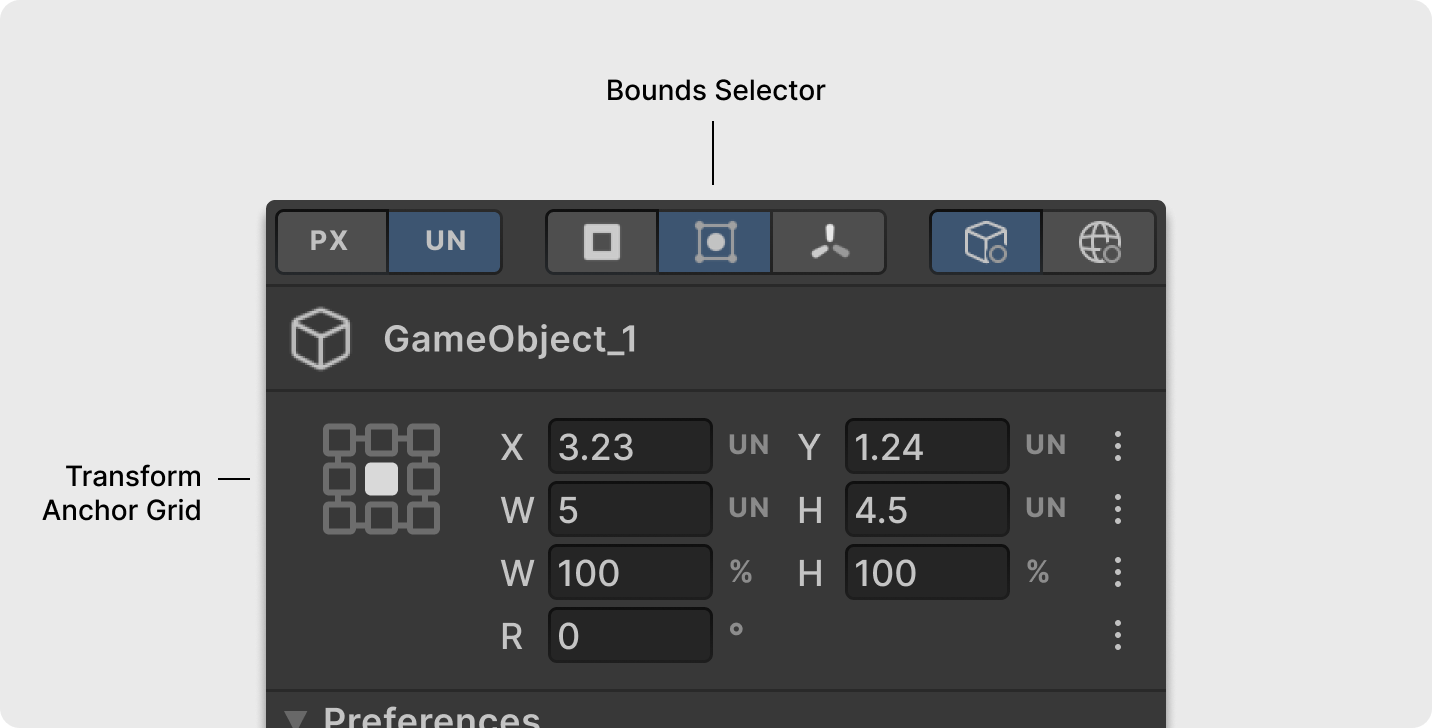
Transform2D fixes this by detecting your GameObject's bounds and letting you dynamically set transformation anchor points. This makes common tasks intuitive—positioning an object to the right of another or resizing from its bottom edge becomes as simple as selecting the anchor point, while setting precise dimensions is as straightforward as entering width and height values.
#
Setting the Transform Anchor
Use the Transform Anchor Grid to select anchor points on the object's bounds (corners and centers) for position, size, scale, and rotation.
Tip!
It's also handy for just quickly viewing the coordinates of your game object's bounds.
#
Setting Game Object Bounds
Transform2D supports various bounds sources to fit your specific needs, whether you're positioning objects visually, logically, or even aligning to a Camera's edge.
Use the Bounds Selector to pick the current game object’s preferred bounds source:
- Collider2D: Uses bounds from a Collider2D component, ideal for referencing logical or physical boundaries. If multiple colliders exist, it uses the first one.
- SpriteRenderer: Uses sprite asset bounds from the SpriteRenderer component, perfect for referencing visual boundaries.
- No Bounds: Reverts to Unity's default Transform behavior. No bounds are detected, width and height are set to
0, and the anchor grid is disabled. All transformations use the game object's origin point.
If the selected source isn't available on the current game object, Transform2D temporarily falls back on another source in this priority: Collider2D → Sprite Renderer → No Bounds. For example, if you select SpriteRenderer but the component is missing, Transform2D will use Collider2D if available; otherwise, it defaults to No Bounds.
#
Using Camera and Text bounds
Transform2D offers specialized support for Camera and non-UI TextMeshPro (TMP) game objects. This allows for precise placement, such as positioning a collider just outside a camera's edge or aligning TMP objects with exact margins, without needing a UI Canvas.
When a game object includes a Camera or TextMeshPro component, Transform2D automatically uses that component as its bounds source, overriding other selections. A notification will appear to confirm this. If both are present, the Camera component takes precedence.